For most of the last decade, an AI lab in a university or polytechnic meant a room of GPU workstations, and a robotics lab meant a few industrial arms running taught paths. Physical AI joins the two. Robots now learn skills from human demonstrations and from simulation, and the models that drive them can read camera images and plain-language instructions.
That changes what a teaching lab has to do. Students need to collect demonstration data, train a policy, test it in simulation and then watch it succeed or fail on a real robot. This guide sets out what a Physical AI teaching lab needs in 2026, the software it runs on, and how to phase the build so it is useful from the first semester.
We design and install Physical AI Labs for universities, polytechnics, vocational colleges and research teams, so this is written from what we see in real projects.
Why institutions are building Physical AI labs now
Three things have changed in the last two years.
The models got general. Vision-language-action (VLA) models take camera images and an instruction and output robot actions. NVIDIA's Isaac GR00T N1.6, announced in January 2026, pairs a Cosmos-Reason vision-language backbone with a 32-layer diffusion transformer that generates motor actions, and was trained on thousands of hours of teleoperation data from several robot types. Physical Intelligence open-sourced the weights and training code of its π0 model in 2025. Students can now fine-tune a capable model rather than start from scratch.
Data became the bottleneck, and the curriculum. Large robot datasets such as Open X-Embodiment pooled more than a million real robot episodes from 22 robot types across over 20 institutions. Every one of those episodes was recorded by a person driving a robot. Knowing how to collect clean, useful demonstrations is now a core skill, not a research side task.
The tools became teachable. Open-source libraries like Hugging Face's LeRobot (Apache-2.0) cover the whole loop: teleoperation, dataset recording, training imitation-learning policies such as ACT and Diffusion Policy, and running them on the robot. NVIDIA Isaac Sim and Isaac Lab give every student a simulated robot before they touch a real one.
In Singapore there is also a clear policy signal. In May 2026 the Minister for Education announced that from 2027, students entering the universities, polytechnics and ITE will learn baseline AI competencies through compulsory modules, with a dedicated framework for polytechnics and ITE. Physical AI is where engineering students meet AI in a form they can see and touch.
The four parts of a Physical AI teaching lab
Every lab we plan, whatever its size, has the same four parts. They map onto the robot learning loop: simulate, demonstrate, train, deploy.
1. Simulation workstations. GPU workstations running NVIDIA Isaac Sim and Isaac Lab, where students build scenes, run reinforcement learning, and test policies before they reach hardware. Simulation is where most of the hours go, because it is safe, repeatable and lets a whole class work at once. NVIDIA's documented requirements for Isaac Lab teleoperation start at an 8-core CPU, 32 GB of RAM (64 GB recommended) and an RTX 3090-class GPU or better.
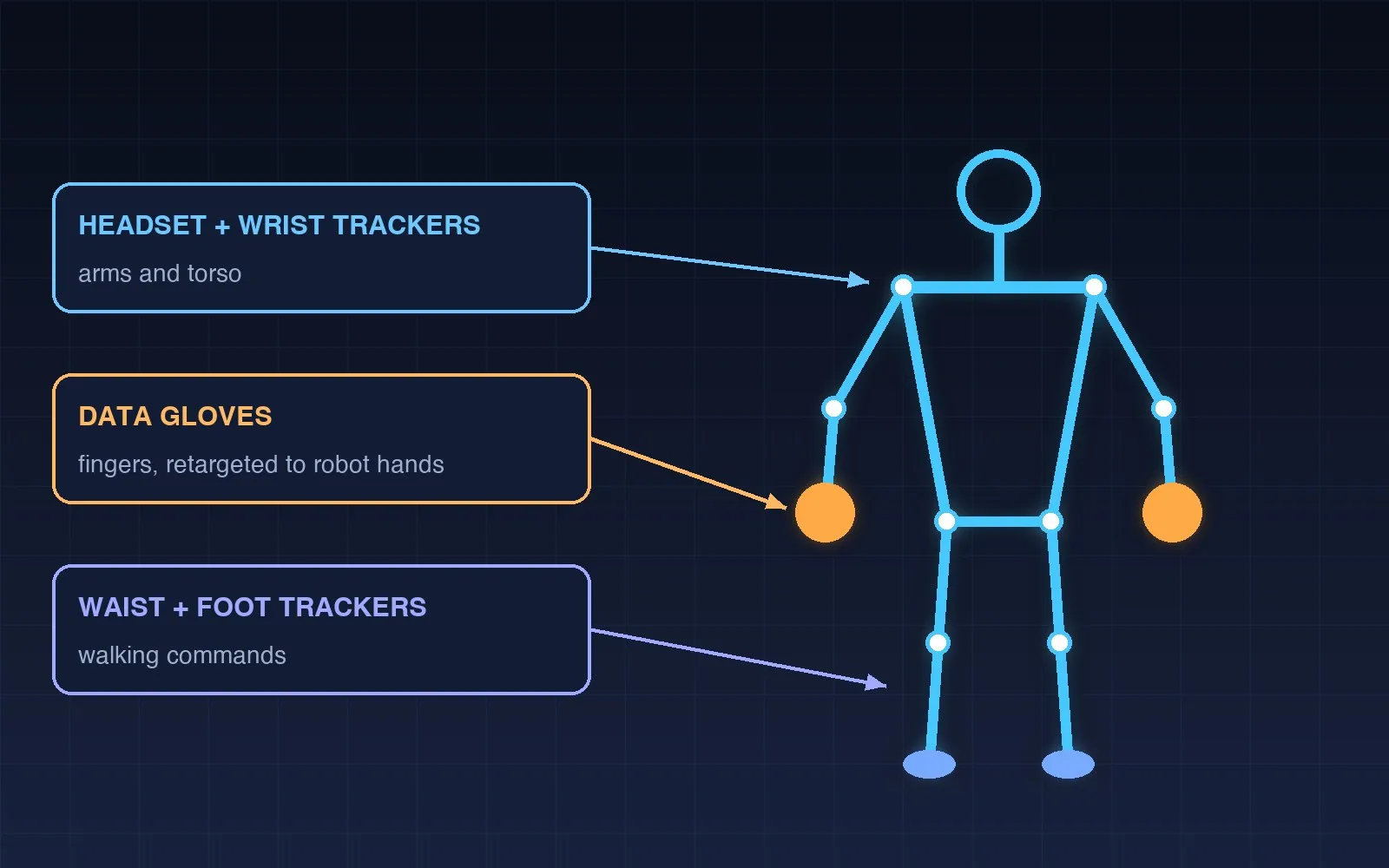
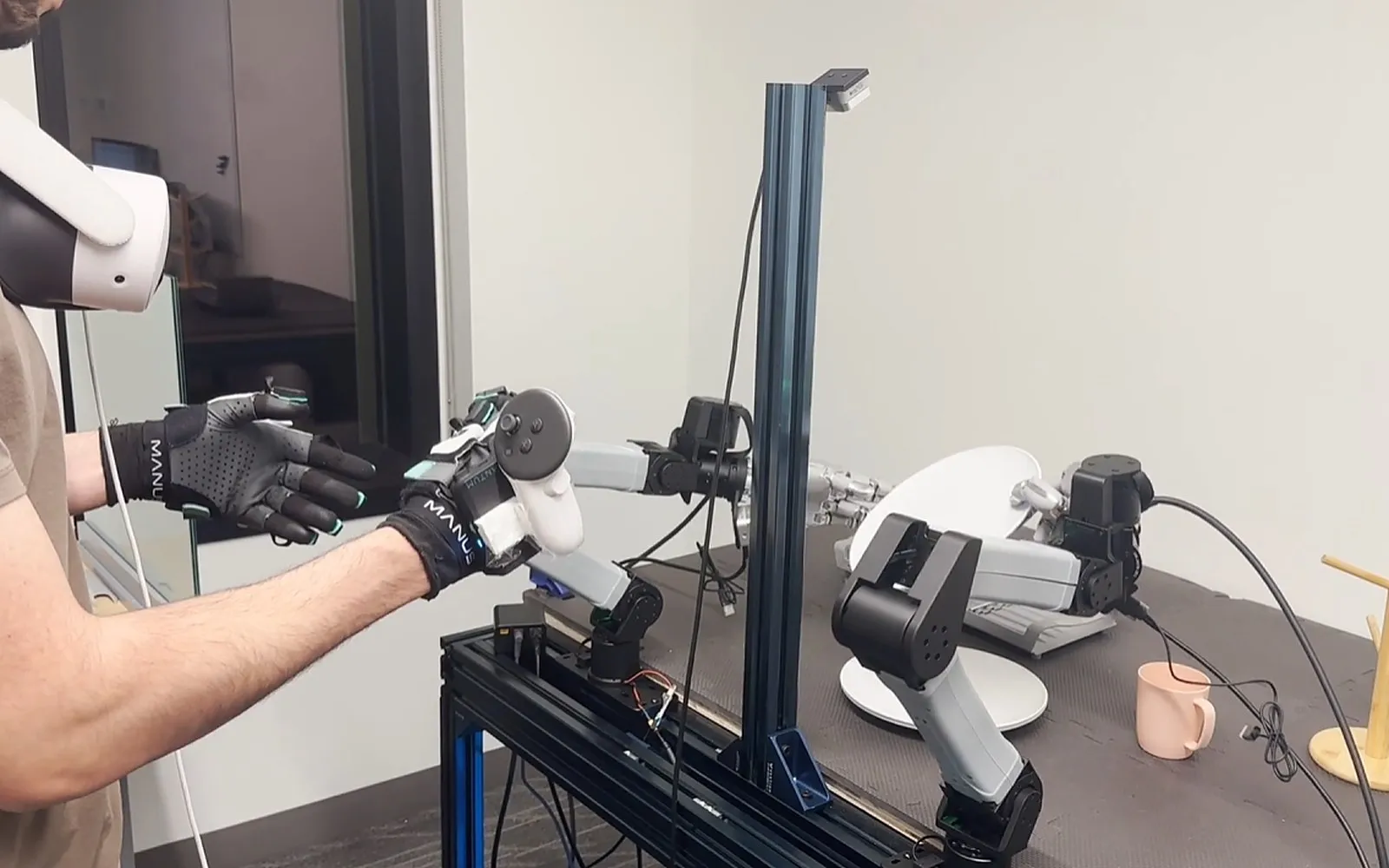
2. Teleoperation and data collection stations. This is where a person drives a robot, real or simulated, and every movement is recorded with camera images as a demonstration. The input device matters:
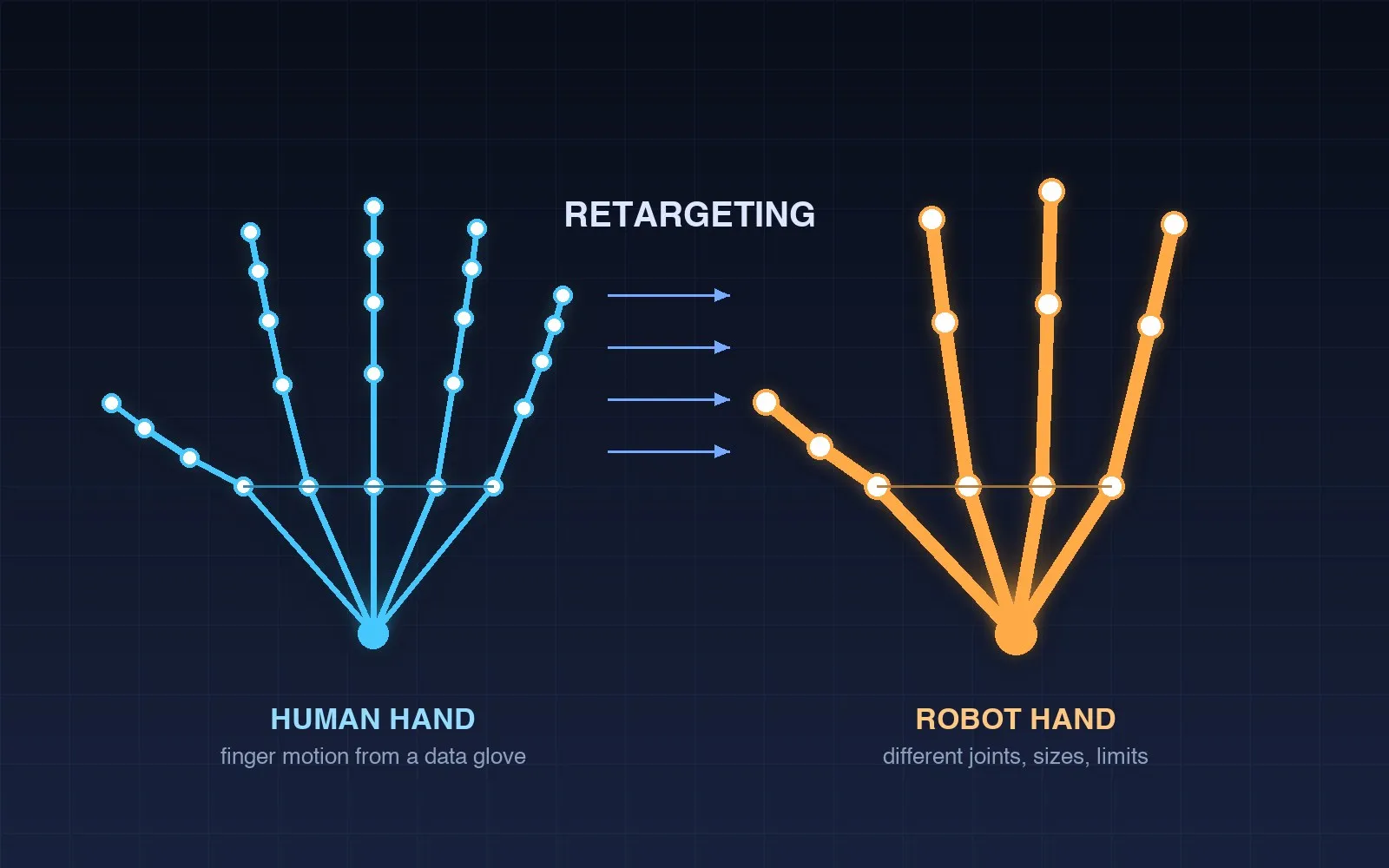
- Data gloves capture every finger joint, which is what a dexterous robot hand needs. NVIDIA Isaac Teleop supports MANUS gloves through a bundled plugin and recommends glove or hand tracking for dexterous hands.
- Force feedback devices let the operator feel contact. Isaac Lab includes a teleoperation setup for the Haply Inverse3, which streams contact forces from the simulated robot back to the operator's hand. This matters for insertion, assembly and anything where pushing too hard breaks the task.
- XR headsets give the operator a stereo view from the robot's cameras and add head and hand tracking.
- Leader-follower arms, such as the low-cost SO-101 arms used with LeRobot, are a simple, robust way for beginners to record arm demonstrations.
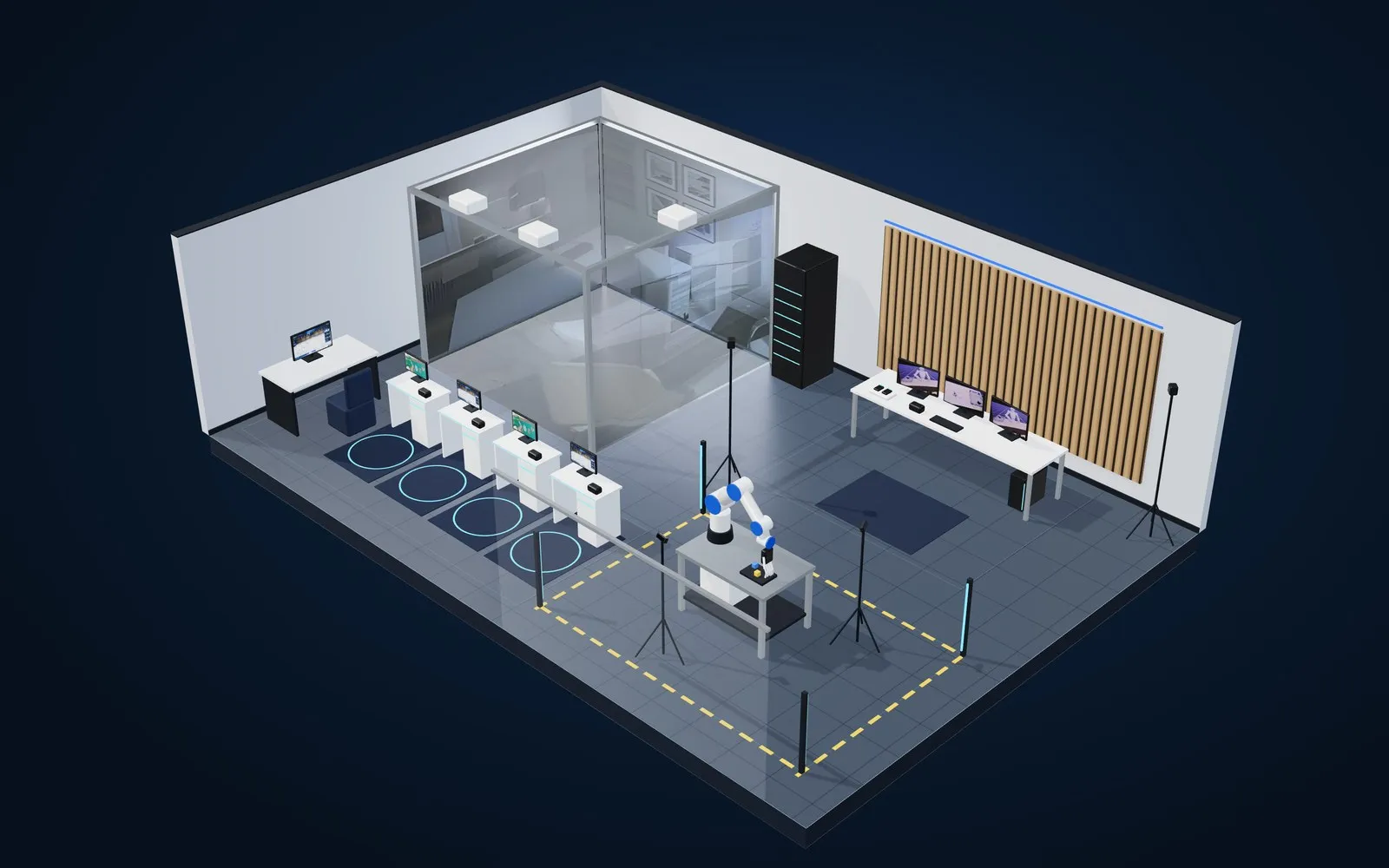
3. Real robot cells. At least one robot that students can run policies on: a collaborative arm with a gripper or dexterous hand, two arms for bimanual tasks, or a mobile base. Each cell needs RGB-D cameras, a safe work area, an emergency stop and a clear marking of where people may stand.
4. Compute and data infrastructure. Somewhere to store and version datasets, and enough GPU capacity to train and fine-tune policies. For a teaching lab this is often a shared GPU server, so training jobs do not block the workstations students sit at.
The software stack
The good news for teaching labs is that the core stack is free or open source.
- NVIDIA Isaac Sim and Isaac Lab for simulation, reinforcement learning and policy evaluation.
- NVIDIA Isaac Teleop to drive robots from XR controllers, hand tracking, data gloves and other devices through one session.
- ROS 2 to connect robots, cameras and sensors on the real cell.
- LeRobot for recording datasets in a standard format and training imitation-learning policies (ACT, Diffusion Policy) and VLA models (π0, π0.5, SmolVLA, GR00T).
- Open foundation models such as GR00T and π0 that students fine-tune on their own demonstrations.
A lab that standardises on these tools teaches skills students will use in industry, and it can take in new models as they are released without replacing hardware.
What students do in the lab
A good Physical AI lab is built around coursework, not around the robot. A typical module runs like this:
- Build the task in simulation. Students set up a pick-and-place or assembly task in Isaac Lab and train a baseline policy.
- Collect demonstrations. In pairs, they teleoperate the robot through the task 50 to 200 times, with gloves or a leader arm, while cameras record each episode.
- Train and compare. They train an imitation-learning policy on their data, fine-tune a pre-trained VLA model, and compare the two.
- Deploy and debug. They run both on the real robot, measure success rates, and work out why the robot fails. Usually it is the data: inconsistent demonstrations, poor camera angles or too little variety.
- Improve the hardware. Final-year students often design their own grippers, sensor boards and fixtures. A desktop PCB machine such as the PewCB One lets them make a custom circuit board in about 30 minutes, so a sensor or controller board can be tested the same day it is designed.
This is the full Physical AI cycle, and it is the same loop that robot companies run every day.
Planning the room
A combined lab for a class of 20 to 30 students fits comfortably in about 80 to 120 square metres. The main things to get right:
- Zones. Keep simulation desks, teleoperation stations and robot cells in separate zones. Robot cells need a marked safety perimeter and should not sit on the main walkway.
- Power and network. GPU workstations draw serious power. Plan dedicated circuits, and a wired network so teleoperation latency stays low and datasets move quickly to storage.
- Cameras and lighting. Imitation learning is sensitive to lighting changes. Even, diffuse lighting and fixed camera mounts make datasets more consistent.
- Storage. Datasets with video grow fast. Budget for several terabytes per cohort.
- Safety. A risk assessment for each robot cell, emergency stops within reach, and clear rules on who can run untested policies on real hardware.
Phasing the build
Few institutions build everything at once. A phased plan keeps the lab useful from the first semester:
- Phase 1: Simulation teleoperation lab. Workstations, Isaac Sim and Isaac Lab, and teleoperation devices such as data gloves and force feedback. No physical robot is needed, so it is the fastest and lowest-risk start.
- Phase 2: Dexterous teleoperation lab. Add one collaborative arm with a dexterous hand, RGB-D cameras and ROS 2, so students can close the loop from simulation to a real robot.
- Phase 3: Bimanual data lab. Add a second arm and hand, or a humanoid upper body, and several data collection stations, so the lab can produce datasets for research projects and industry partners.
These match the three standard configurations of our Physical AI Lab, and each phase reuses everything from the one before.
Common mistakes
- Buying the robot first. Without simulation and a data collection plan, an expensive robot ends up running demos. Start from the modules you want to teach.
- Treating data as an afterthought. Decide early how demonstrations are recorded, labelled and stored. Good data habits are what students carry into industry.
- One robot for a whole class. Simulation and teleoperation stations let everyone work in parallel. The real robot is for testing, not for every lesson.
- No plan for support. Firmware, drivers and software versions change quickly in this field. A lab needs someone responsible for keeping it running, and a supplier who will help.
How we build Physical AI Labs
We plan, supply, install and support Physical AI Labs in Singapore and the region. One team handles the site survey and layout, equipment, installation and calibration, connection to NVIDIA Isaac and your robots, and staff training. We supply MANUS data gloves and the Haply Inverse3 force feedback device, and many labs pair a Physical AI Lab with an XR Lab for VR training and immersive teaching.
If you are planning a Physical AI or robotics teaching lab for a polytechnic, ITE, university or research team, tell us what you want students to learn and the room you have, and we will propose a layout and phased plan.
FAQ
What is a Physical AI lab?
A lab where students and researchers teach robots skills through simulation and human demonstrations, then test the resulting AI policies on real robots. It combines simulation workstations, teleoperation and data collection stations, real robot cells and GPU compute.
Do we need a real robot to start?
No. A simulation teleoperation lab with Isaac Sim, Isaac Lab and teleoperation devices teaches most of the workflow. Real robots can be added in a later phase.
What software does a Physical AI teaching lab use?
Typically NVIDIA Isaac Sim and Isaac Lab for simulation, Isaac Teleop for teleoperation, ROS 2 for real robots, and Hugging Face LeRobot for datasets and policy training. Most of this stack is free or open source.
Why use data gloves and force feedback?
Dexterous robot hands need finger-level input, which data gloves capture. Force feedback lets the operator feel contact, which improves demonstrations for insertion, assembly and other contact-rich tasks.
How big does the room need to be?
A combined lab for 20 to 30 students usually needs about 80 to 120 square metres, with separate zones for simulation, teleoperation and robot cells.
Is this suitable for polytechnics and ITE?
Yes. A phased lab starting with simulation and teleoperation suits diploma and Nitec-level engineering courses, and connects naturally to Singapore's push for AI competencies across all institutes of higher learning from 2027.
Sources
- NVIDIA Technical Blog, "Building Generalist Humanoid Capabilities with NVIDIA Isaac GR00T N1.6 Using a Sim-to-Real Workflow" (8 January 2026): https://developer.nvidia.com/blog/?p=111368
- NVIDIA Isaac Teleop, MANUS gloves device documentation: https://nvidia.github.io/IsaacTeleop/preview/pr-998/device/manus.html
- NVIDIA Isaac Lab, "Isaac Teleop": https://isaac-sim.github.io/IsaacLab/release/3.0.0/source/features/isaac_teleop.html
- NVIDIA Isaac Lab, "Setting up Haply Teleoperation": https://isaac-sim.github.io/IsaacLab/develop/source/how-to/haply_teleoperation.html
- Hugging Face, LeRobot (Apache-2.0): https://github.com/huggingface/lerobot
- Open X-Embodiment Collaboration, "Open X-Embodiment: Robotic Learning Datasets and RT-X Models": https://arxiv.org/abs/2310.08864
- Physical Intelligence, openpi (π0 weights and code): https://github.com/Physical-Intelligence/openpi
- Ministry of Education Singapore, speech by Minister Desmond Lee at the NUS120 Distinguished Speaker Series (21 May 2026): https://www.moe.gov.sg/news/speeches/20260521-speech-by-guest-of-honour-minister-for-education-minister-in-charge-of-social-services-integration-mr-desmond-lee-at-nus120-distinguished-speaker-series
- Physical AI Lab
- Robotics Teaching Lab
- Embodied AI
- Robot Teleoperation
- Imitation Learning
- NVIDIA Isaac
- Singapore
- Polytechnic and ITE